If you are looking for a YOYO video call, start from the official YOYO Web entry. You may be asked to sign in or complete other account steps. Follow the prompts shown on your device, then grant camera or microphone access if the activity you choose requires it.
YOYO is a social video chat experience for meeting and communicating with people across languages. Its iPhone release history describes a friendship-based model in which text, audio and video chats take place between mutual friends. The separate Web experience can have different access requirements, so use the current Web interface to see which actions are available rather than assuming that an older app tutorial still applies.
Open the right YOYO Web entry
Use the official Web entry provided by YOYO rather than choosing a similarly named site from a search result. Open YOYO Web. If you're using a channel-specific link from a blog or a recommendation, keep that link intact so the page opens the intended entry point.
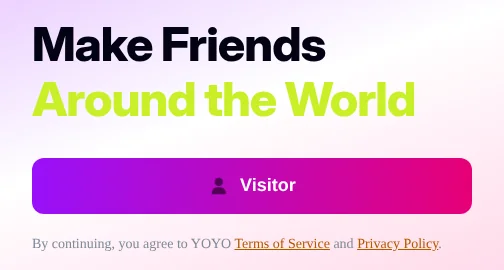
Once there, take a moment to read the current options. Depending on the product version and your location, you may see a visitor entry, account prompt, an exploration screen or an invitation to start a conversation. Use the entry option the actual Web interface offers. A guide should not promise a button that may have changed since it was written.
Pick the kind of conversation you want
There is no single “right” way to meet people online. A conversation can begin with curiosity about someone else's day, a shared interest in music, or a story about a place you've never visited. If you like surprises, you may enjoy a quicker discovery flow. If you want a more deliberate conversation, take a moment to explore the people or activities that are available before joining.
YOYO's Web experience is worth trying as a social starting point. You can then compare other formats if you discover you want something more specific. Kiss Web, for example, describes profile-led one-on-one calls. LiveGo Web offers another social environment to explore. The best fit depends on the actual option you choose, not a generic “best chat app” ranking.
A short checklist before the first call
- Open the official entry and follow the account or eligibility prompts.
- Check which social and calling features are currently available.
- Allow camera and microphone access only if required for the activity you choose.
- Check any price or currency deduction before accepting a paid feature.
- Say something simple. Ask about music, travel, a recent show or whatever interests you both.
A good first-session routine is to follow the prompts in front of you rather than opening several services at once. If you're on a phone, our video chat on iPhone browser guide covers Safari permissions and common first-call issues. Using a laptop? Read video chat on Mac or video chat on PC. If you prefer a different communication format, explore text, voice and camera options.
What if you don't want to download an app?
A Web entry is useful when you want to try a service from an existing browser tab. It avoids making an app installation the first step. It does not automatically mean every app feature is present in the browser, or that every call is free. Check the current YOYO Web interface for the functions you intend to use.
If a Web screen asks you to sign in, do not assume the product is broken. It may be an account-based feature or a different part of the service. Follow the visible entry flow, or return to the main Web entry and choose another supported option. Our guide to video chat without sign-up explains the difference between guest access and truly unrestricted use.
Make the first conversation less awkward
You do not need to perform a perfect introduction. Start with a simple question that has an easy answer: “What music have you been listening to lately?” or “What's somewhere you'd love to visit again?” The other person has something to respond to, and you have room to ask another question.
The best chats usually move away from the original opener quickly. If someone mentions a favorite city, ask what surprised them about it. If they mention a game, ask what makes it fun. Give a little of your own perspective too. For more suggestions, read our video chat conversation starters.
How YOYO compares with other Web chat choices
| If you want… | A good place to explore | Why |
|---|---|---|
| A social video-chat experience | YOYO Web | Try the current YOYO conversation environment |
| Browse people before a 1v1 call | Kiss Web | Profile-led discovery and direct calls |
| Another social Web atmosphere | LiveGo Web | Explore available interactions and rooms |
| An automatic random match | Chatroulette | Classic roulette-style video chat |
The comparison describes the overall style—not a guarantee of a specific room, filter or free feature. For Kiss, the official Web website says each new one-on-one call begins with 60 free seconds and coins apply if you continue. For YOYO and LiveGo, confirm the current Web steps and prices inside the live experience.
FAQ
Can I use YOYO in a browser?
Yes, YOYO has a Web entry. Open the current official link and follow the live interface to see what conversation modes are available.
Is YOYO Web the same as the mobile app?
Not necessarily. Features and entry steps can differ between Web and app versions, so the browser interface is the reference for Web use.
Do I have to create an account first?
Use the available visitor or login choice shown in the current Web flow. Account requirements can differ by action or version, so avoid assuming the same rule for every feature.
Is YOYO Web free?
Check the live product's free entry and any usage or paid-feature notices. “Can open the page” does not necessarily mean unlimited free calls.
What if my camera or microphone doesn't work?
Review browser permissions, close other apps using the camera, and test your mic or headset. See our camera and microphone troubleshooting guide.
What can I talk about on my first visit?
Music, hobbies, movies and travel are easy starters. Ask one question, listen and follow whatever feels interesting.
Ready for a conversation?
The best way to understand a social video-chat experience is to try it for a short session and see whether the pace feels right. Start with YOYO Web and let the conversation take its own direction. If you want other styles afterward, compare our best video chat sites guide.